NexTrain Wear ⌚️ (Apple Watch / Android WearOS)
Welcome
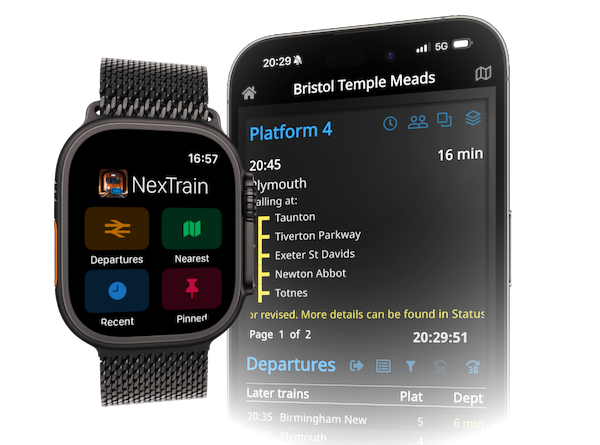
Stay ahead of your journey with NexTrain Wear, the ultimate watch app for tracking trains in real time. Whether you’re on an Apple Watch or a WearOS device, this app brings all the info you need to your wrist. Now, you can plan smarter, travel better, and be in control—wherever you go
.
Roam Free
- Standalone mode: Use NexTrain Wear even when your phone’s out of range. Whether on WiFi or 4G, you’ll always have the latest transport info on your wrist.
- Integrated mode: When you're near your phone, you can use its data connection and your selected station will be synced.
Getting Started
Android Phone & Wear OS
Download the NexTrain app directly from the Play Store, be sure download both the phone and watch versions

iPhone & Apple Watch
Download the NexTrain app from the App Store, then go to your Watch application and enable NexTrain on your wearable.

Watch Complications
Life doesn't have to be complicated, but it helps!
Make it quick and easy to launch NexTrain Wear by adding a complication to your favorite watch face:
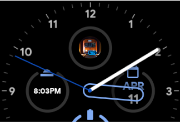
- Apple Watch: Add the NexTrain custom complication
- Wear OS: Add NexTrain using an app shortcut

Main Menu
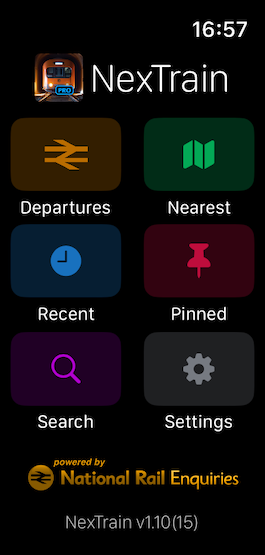
- Tap Departures to view a list of trains leaving the currently selected station. From here you can tap on a train to bring up the Journey view and see its calling points.
- Tap Nearest to choose from a list of stations close to you. You will need to give location permission to use this feature.
- Tap Recent to choose from a list of stations to have visited. These are automatically set for you as you select a station.
- Tap Pinned to choose from you have saved with a pin 📌. Pins can be set on many of the other screens.
- Tap Search to find one of more than 2,500 stations in England, Scotland and Wales. You can use any part of the name to search.
- Tap Settings to configure NexTrain Wear, including: - Coach style (text or icons)
- Display operator logo, name or a compact view
- Select from several great looking themes
- Decide how many services to show
- Wherever you are in NexTrain Wear remember that you can can always tap on the < button to return to this menu (tap twice if you're in the Journey view)
Departures

Departures
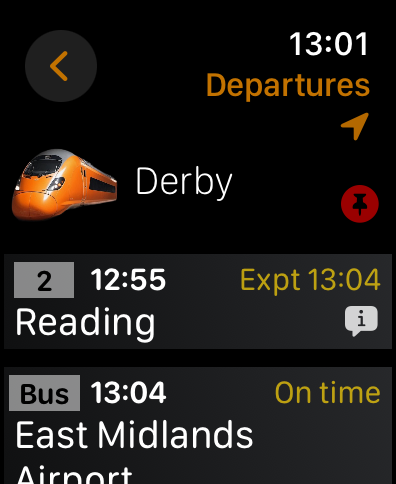
- NexTrain will show you up to 30 departures, or a maximum of 2hrs of trains.
- Tap 📌 to pin the station as a favorite
- Tap the arrow at the top right to go to the nearest station. Note: If you are already at the nearest, or have not given permission to use location then this will be greyed out.
- Tap on any service to bring up the Journey view and see calling points and any messages.
- Expect to see platform (if known) the scheduled departure time, current status and destination. Routing information will be shown if it applies, eg "via Stockport". Number of carriages is also shown if it is available.
- Depending on the theme you choose you can also see the train operator logo or name (this is hidden in "Compact" view, see Settings)
- Bus services are shown if any are present (rail replacement or airport transfers)
- Look for the ℹ️ information icon, it means there is a message about this service, whether delayed or cancelled. Tap on the service to view the message.
Journey
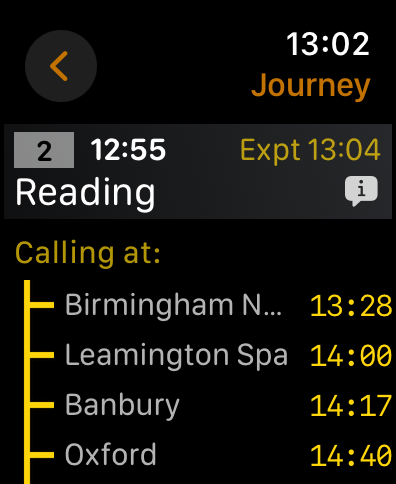
Top section:
- Tap on the the < button to return to the Departures view and select a different departure
- A summary of the service is shown
Middle section:
- You'll see the calling points for this service, scroll to view all of them
- If this is a dividing service you will see these broken out into common/front/rear calling points
- If a calling point is in the past it will be greyed out
Bottom section
- If you have turned on Compact view (see Platform style in Settings) then the train operator name is shown
- Number of coaches will be shown if available (see Coaches style in Settings)
- Delay or cancellation messages are shown if applicable
Stations

Nearest
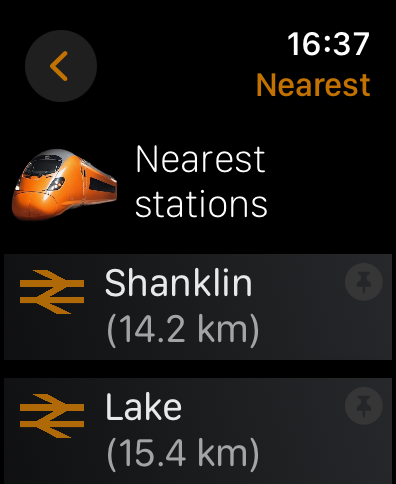
- Shows you close-by stations with the distance indicated
- Tap on a station to go to the Departures view
- Tap 📌 to save the station to Pinned Stations as a favorite
- You will see the message "Waiting for location..." if you haven't get given permission to use your location

Recent
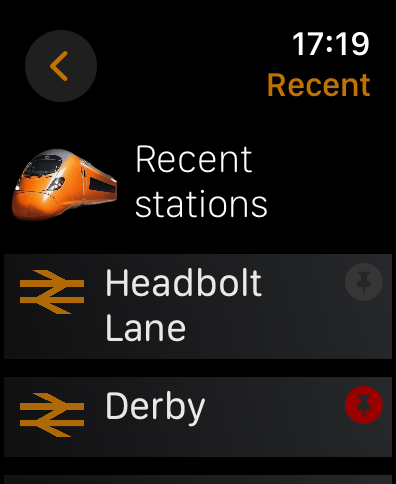
- Shows you stations that you viewed while you've been using NexTrain, most recent first
- Tap on a station to go to the Departures view
- Tap 📌 to save the station to Pinned Stations as a favorite

Pinned

- Stations that you pin as favourites can be seen here
- Tap on a station to go to the Departures view
- Tap 📌 to remove the station from the pinned list, it will disappear

Search
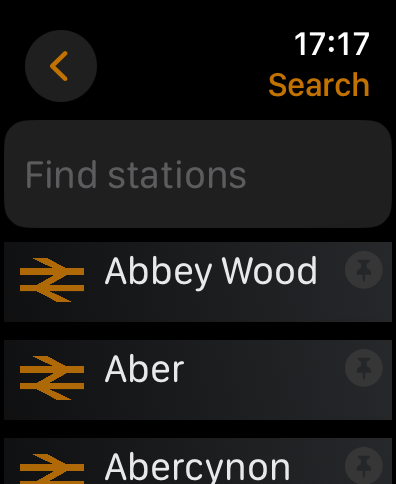
- From here you can search any of the 2,500+ stations in England, Scotland and Wales
- The search uses wildcard text so you can type any part of the name
- Tap on a station to go to the Departures view
- Tap 📌 to save the station to Pinned Stations as a favorite
Adjusting the settings

Settings

- Coach style - You can choose to display the number of coaches in text form, or using coach icons. Remember that number of coaches only appears if provided by the train operating company.
- Platform style - There are three options, to display the Operator Logo, the Operator Name or Compact style.
- Logo or Name shows the train operator in the departures view.
- Compact gives you more services on the departures view and the train operator name at the bottom of the Journey view.
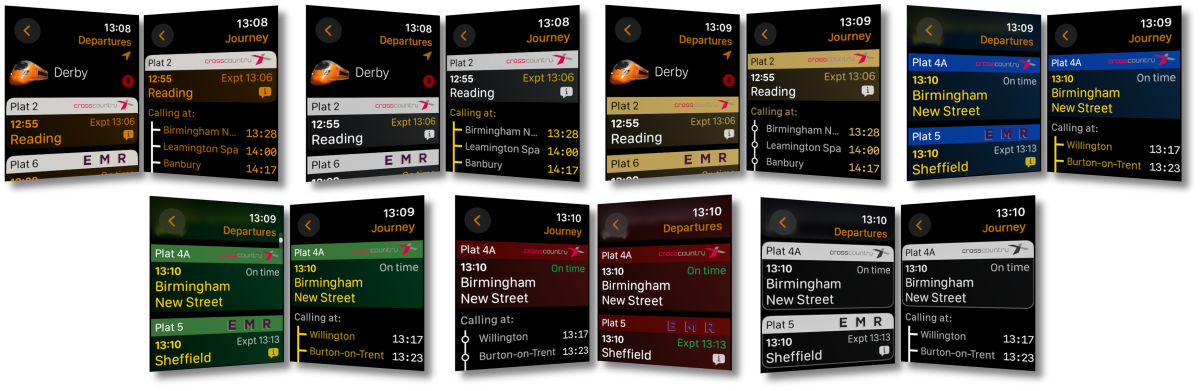
- Theme - NexTrain Wear offers several great colour themes: Ochre, Silver, Gold, Blue, Green and Red. There is also a High Contrast black & white theme to assist the visually impaired.
- Services to show - Choose from 10 (Faster), 20 (Balanced) or 30 (More) to tell NexTrain how many services to show on the departure view.
Theme Gallery
Here are all the great NexTrain Wear themes available to you via settings. They are Ochre, Silver, Gold, Blue, Green Red and High Contrast. Which theme will you choose?
Compact styles
Enable platform style Compact in settings to show more services in the departure view by suppressing the heading row. This is better for small devices or if you just want to fit more departures onto your watch screen.

Stay In Sync
- Current station: When you select a station on your watch, if your phone is in range it will sync with your phone and vice versa, ensuring that the information is consistent across both devices.
- Location: If you have given permission to use your location, your phone will let your car system know the nearest stations
Upgrade To NexTrain Pro
Unlock NexTrain Wear, Drive and Widget* and a fully ad-free experience to get more out of your journey.
Pro Monthly
£
Our
premium, ad-free experience
1.99
/mo
- 50p per week
- All
the features of Mobile
- 🚫 No Ads
- 🚘 Drive
- ⌚️ Wear
- 📺 TV (Android Only*)
- ⚙️ Widget (Android only*)
Pro Annual
£
Our most popular
option
19.99
/yr
- Only 39p / week
- All the features of Mobile
- 🚫 No Ads
- 🚘 Drive
- ⌚️ Wear
- 📺 TV (Android Only*)
- ⚙️ Widget (Android only*)
* NexTrain Widget and TV currently only available on
Android OS